
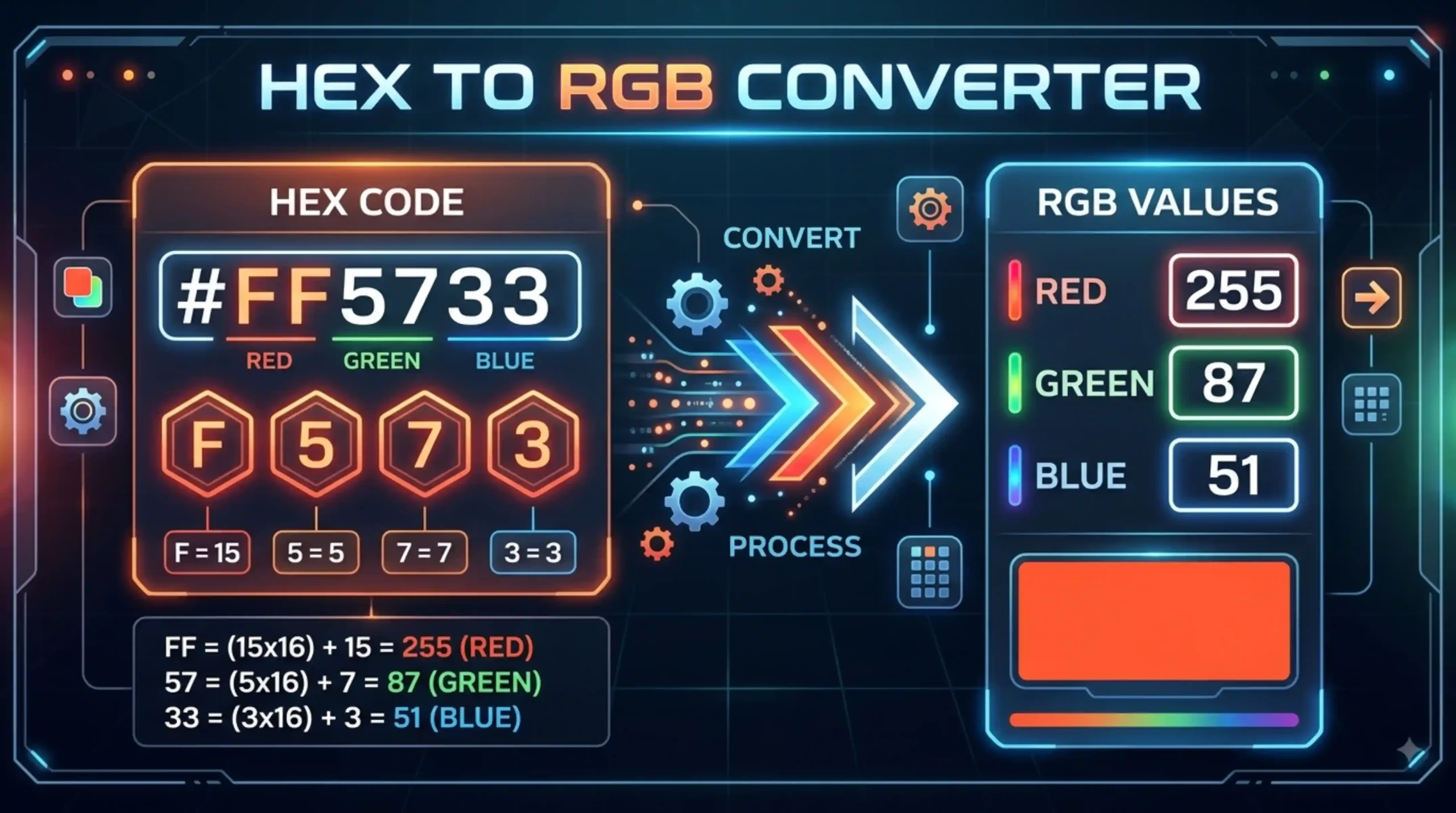
HEX to RGB Converter
Convert HEX colors into RGB instantly.
Need Help Using Hex To RGB Converter
A hex color code starts with a pound sign (#) followed by six hex values or three pairs of hex values (#AFD645). Usually the code is associated with HTML and web sites that are viewed on a screen. The pairs of hex values are corresponding to the RGB color space. (github) The system is base-16, i.e. digits 0-9 and the letters A-F. Hex color codes are based on hexadecimal (base 16) numbers. RGB color code values are based on the decimal ( base 10 ) number system . (educational) This is the short form most developers use to specify colors in CSS and HTML.
RGB (red, green and blue) is a way of describing colors on a computer screen. Different proportions of Red, Green and Blue can be mixed to create any of the colors of the visible spectrum. 256 levels per color ), or the range of decimal numbers from 0 to 255 . This is equivalent to the range of binary numbers 00000000 to 11111111 , or hexadecimal 00 to FF . Each can be one of 256 possible colors, for a total of 256 * 256 * 256 = 16,777,216 possible colors.
Hex To RGB Conversion The first two digits of the hex color code are converted to decimal to obtain the red color level . The next two digits are converted to decimal to get the green color level. The last two digits are converted to decimal to provide the blue color level. For example, #394DFE: 39 becomes 57, 4D becomes 77 and FE becomes 254 — rgb(57, 77, 254) (RapidTables). (OpenReplay) Most online tools do this instantly by pasting in your hex value.
The RGB format is just more flexible when you want to do things like transparency effects or manipulate colors in JavaScript . It also makes it easier to do math to blend colors or generate colors algorithmically in programming contexts . The RGB values also give an intuitive description of the color that can be easily understood and modified by non-technical team members. (Hexcalculator) RGB notation is usually easier to work with programmatically. Channels are just integers you can tween, mix, or compare. RGB notation is used when a stylesheet expects rgb() syntax or when you need channel values for canvas and WebGL code.
Oh yes. Certainly. HEX to RGB conversion is just expressing the same color in a different model . HEX uses a 6 digit hexadecimal code for red , green and blue while RGB uses red , green and blue channels from 0 to 255 . (Colorffy) For example, the hex code #FF5733 is the same as RGB(255, 87, 51), so you can see right away how strong the color is. (Hexcalculator) Neither format changes the actual color, they are just two different notations for the same sRGB value underneath.
Basic rgb and 6 digit hex do not have transparency data. For transparency there are two options, RGBA with a fourth alpha value (from 0 to 1) added to RGB, e.g., rgba(79, 70, 229, 0.5) for 50% transparency, or 8-digit hex with two more hex digits added for the alpha channel, e.g., #4F46E580. RGBA is safer for cross-tool compatibility. 8-digit hex works in all modern browsers, but not so universally in older design tools.
A 3 digit hex code (like #F53) is a shortcut where each digit is doubled to create a 6 digit code. For example #F53 becomes #FF5533. (Hex to String) Most converters are designed for normal 6 digit codes, if you have a 3 digit code, you need to expand it by repeating each character, before putting in a converter. Some tools however support 3 digit hex shorthand as well as 8 digit alpha hex (#394dfe80) directly.
With CSS, colors for text, backgrounds, borders, and shadows are often specified directly as RGB and RGBA values. Design software such as Adobe Photoshop, Figma, Sketch and Affinity Designer are mostly built around RGB as it is used to design screen based artwork. All of these are supported by the CSS specifications and modern browsers . RGB values are very compatible . In browser dev tools, it’s common to see element colors displayed as RGBA even when they were originally written in hex.
In Javascript there are 3 steps to convert a hex code to RGB. 1) Get the 2 left digits for red, 2). Get the 2 middle digits for green, 3) Get the 2 right digits for blue. Then use parseInt to convert each pair from hex to decimal . The code is like this: let red = parseInt(value.slice(0, 2), 16); let green = parseInt(value.slice(2, 4), 16); let blue = parseInt(value.slice(4, 6), 16); This gives you three integer values (0–255) that represent each color channel, which you can then use anywhere an RGB value is needed in your code.
Use hex in your stylesheet for brand colors, design tokens, and utility classes. Hex is compact, familiar to designers around the world, and easy to copy and paste from tools like Figma and Adobe. Use RGBA when you need transparency, when you’re building dynamic colors in JavaScript, or when you’re creating CSS custom properties that need to support variable alpha values. RGBA is also easier to think about if you want to change brightness or mix colors programmatically . HSL is also good to consider for design systems for its human readable hue and lightness controls.